
Featured

What Are WhatsApp Usernames? Features, Privacy & How They Work

What Is a WhatsApp Username? A WhatsApp username is a unique identifier linked to your WhatsApp account. Similar to usernames on Instagram, Telegram, or X (formerly Twitter), it lets others find and message you using a name instead of your phone number. For example: Username: @johnsmith Instead of sharing: +91 98765 43210 Once the feature becomes available, users can search and connect using usernames, reducing the need to expose personal contact information. Why Is WhatsApp Introducing Usernames? For years, WhatsApp required every account to be tied directly to a phone number. While this worked well for contacts already saved in your phone, it created privacy concerns when chatting with strangers or businesses. The new usernames feature aims to solve several problems: Better privacy Easier networking Safer online interactions Simplified business communication Reduced phone number sharing This makes WhatsApp more competitive with messaging platforms like Tele...
WhatsApp to bring 2-step verification to desktop, web versions

Meta-owned is reportedly developing the ability to add two-step verification to its desktop app and web version

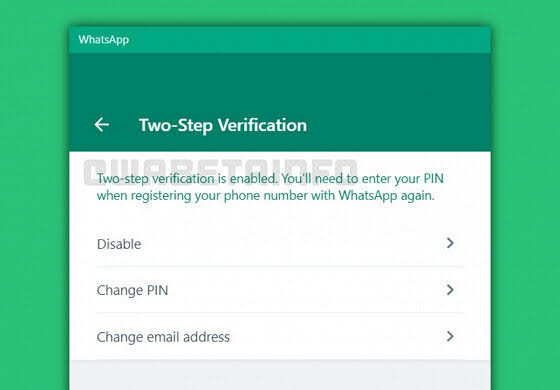
According to WABetaInfo, plans to bring the two-step verification feature to desktop and web versions in a future update. A screenshot provided by WABetaInfo shows that the two-step verification feature can be enabled or disabled on the web and desktop version.

"It will be possible to enable or disable the two-step verification on the web/desktop client. This is very important especially when you lose your phone and you do not remember your PIN. You can restore it by requesting a reset link, but if you are temporarily unable to log into your mail account," adds WABetaInfo.

Two-step verification is already available on the mobile app version where a personal PIN must be entered when registering your phone number with 

WhatsApp is also reportedly testing the possibility of allowing users to migrate chats from their Android device to an iPhone.

The feature was spotted in development in the latest WhatsApp beta for iOS v22.2.74. Currently, it is not available to everyone at the moment. It appears that WhatsApp will rely on an app called Move to iOS in order to make the migration possible.

Comments